Create a Service Page Guide
How to Create a Service Page for Your Business Website
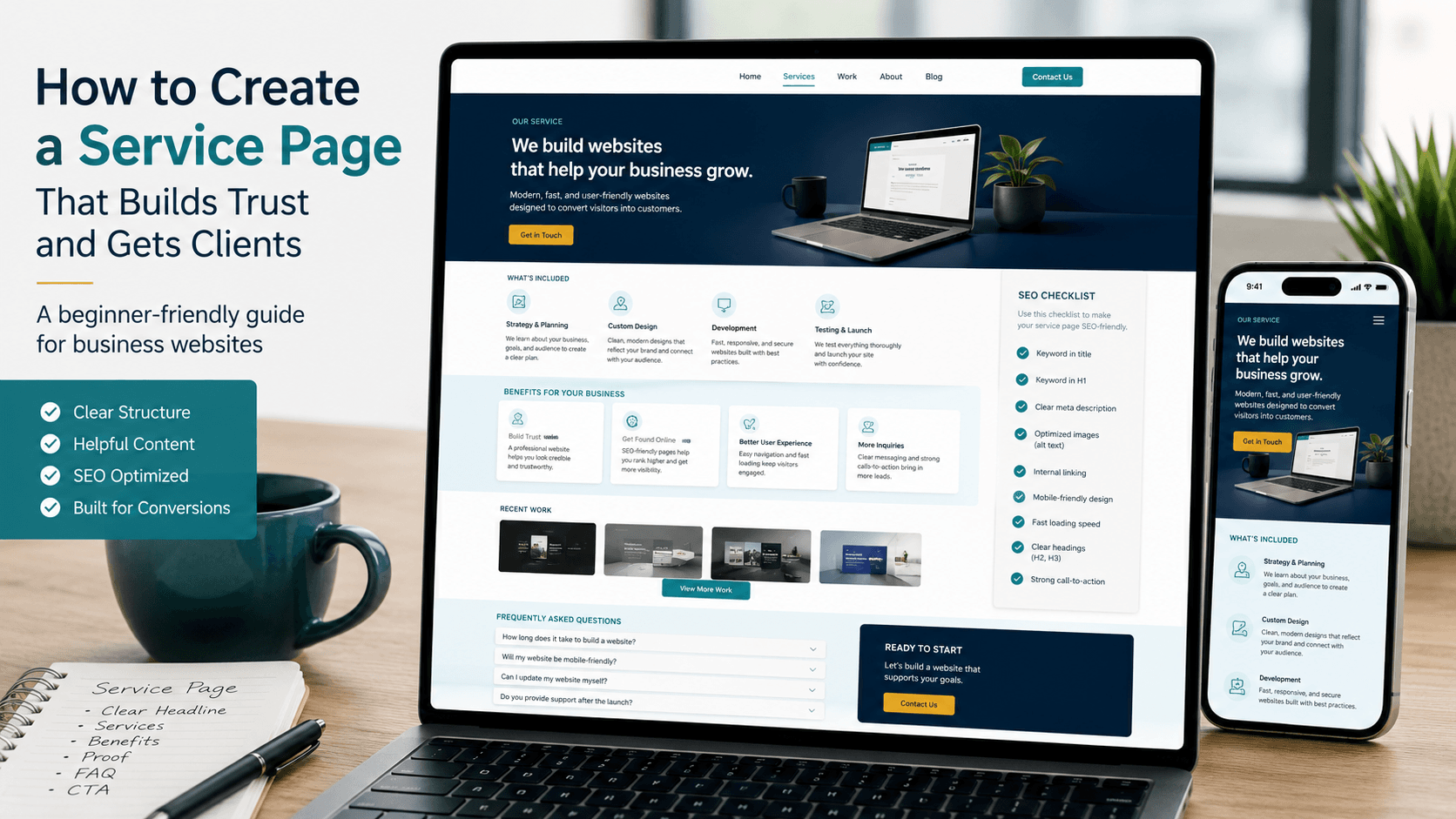
Create a service page by focusing on one service, one visitor problem, and one clear next step. First, this guide shows how to plan the page, write the headline, explain the service, add proof, answer questions, place contact buttons, and prepare the page for search.
Use this as a practical page-building class. Read one chapter, open your website editor, and apply that part. After that, move to the next chapter. As a result, you can create a service page that feels useful instead of confusing.
What You Will Build
Create a Service Page That Helps Visitors Decide
A service page should not only describe what you offer. It should help the visitor understand the service, trust the business, compare the fit, and contact you easily. Therefore, the page needs structure, not just a few short lines.
Clear Service
First, choose one main service and keep the page focused on that service.
Helpful Details
Next, explain what is included, who needs it, and how it works.
Proof
Then, add examples, portfolio links, images, reviews, or practical details.
Contact Flow
Finally, guide visitors to call, message, view pricing, or send an enquiry.
14-Chapter Plan
Follow This Order to Create a Service Page
A service page becomes easier when you build it in the right order. Instead of starting with design, start with visitor intent, then content, then proof, then contact flow, then SEO.
What a Service Page Is
Understand the role of the page.
One Service Per Page
Keep the topic focused.
Visitor Problem
Write for the reason they came.
Headline
Make the first screen clear.
Service Details
Explain what is included.
Benefits
Show value without overclaiming.
Process
Show how the service works.
Proof
Add examples or portfolio links.
Pricing Direction
Guide visitors before enquiry.
FAQs
Answer common doubts.
Contact
Add buttons and form.
SEO
Add title, description, and headings.
Mobile and Speed
Check phone layout and loading.
Final Checklist
Review before publishing.
01 Purpose
Understand Why You Need to Create a Service Page
A service page is a focused page that explains one offer clearly. It helps visitors understand what you do, who the service is for, what is included, how the process works, and how to contact you. As a result, it can support both users and search engines.
A service page should answer
- What service is this?
- Who needs this service?
- What problem does it solve?
- What is included?
- Why should the visitor trust you?
- What should the visitor do next?
Tell the visitor what the service is.
Show details, proof, and examples.
Make contact easy.
02 Focus
Create a Service Page for One Main Service
Do not put every service on one page if each service has different visitors, prices, questions, or search intent. Instead, create a service page for one main offer. This keeps the content clear and helps the page rank for a focused topic.
Good page focus examples
- Restaurant website design
- Hotel and villa website design
- QR food menu setup
- Google Business Profile setup
- Business website design
- WordPress website maintenance
Clear Topic
The visitor knows exactly what the page is about.
Clear SEO
Search engines can understand the page topic better.
03 Visitor
Understand the Problem Before You Create a Service Page
Before writing the page, think about why the visitor is searching. They may be confused, comparing options, checking price, looking for proof, or trying to find someone reliable. Therefore, your service page should speak to that situation directly.
Write these notes first
- What problem is the visitor trying to solve?
- What do they already know?
- What are they worried about?
- What information will help them trust the service?
- What action should they take after reading?
What does the visitor need?
What may stop them?
What should the page explain?
04 Headline
Write a Clear Headline to Create a Service Page
The headline should tell the visitor what service you offer. Avoid clever lines that do not explain the page. A clear headline helps visitors feel they are in the right place. Also, it helps search engines understand the topic quickly.
Headline formula
- Service name + who it is for
- Service name + location if local search matters
- Service name + clear result or purpose
Restaurant Website Design for Cafes and Food Businesses is clearer than We Build Beautiful Digital Experiences.
05 Details
Explain What the Service Includes
After the headline, explain the service in simple language. Visitors should not have to guess what they will get. Therefore, list the important parts of the service and explain them in a way a beginner can understand.
What to include
- Short service introduction.
- What is included in the service.
- What is not included if that avoids confusion.
- What the client needs to provide.
- How long the process may take.
- What happens after enquiry.
Included
Explain the main work clearly.
Needed
Tell visitors what information you need.
06 Benefits
Add Benefits Without Overclaiming
Benefits help visitors understand why the service matters. However, avoid claims that sound too big or hard to prove. Write practical benefits that connect to the visitor’s real needs.
Better benefit examples
- Helps visitors understand your service faster.
- Makes contact options easier to find.
- Supports mobile users with a cleaner layout.
- Gives search engines clearer page information.
- Creates a better path from service details to enquiry.
Avoid this: Do not use exaggerated promises. Keep the language useful, specific, and believable.
Clearer
Visitors understand the offer.
Easier
Visitors know what to do next.
07 Process
Show the Process on Your Service Page
A process section reduces uncertainty. It shows visitors what happens after they contact you. As a result, the service feels easier to understand and less risky.
Simple process format
- Step 1: Send enquiry.
- Step 2: Share business details or requirements.
- Step 3: Receive guidance, plan, or proposal.
- Step 4: Work starts after confirmation.
- Step 5: Review, improve, and complete.
The visitor contacts you.
You understand the requirement.
The service moves forward.
08 Proof
Add Portfolio or Proof When You Create a Service Page
Proof helps visitors trust your service. It can be a portfolio, project screenshots, before-and-after notes, client feedback, images, results from the work, or useful examples. If you do not have many examples yet, show sample layouts or explain your process clearly.
Proof ideas
- Portfolio examples.
- Project screenshots.
- Real photos of work.
- Short case notes.
- Before and after comparison.
- Review or feedback section.
Place proof after service details or before the contact section, where visitors are deciding whether to trust you.
09 Pricing
Add Pricing Guidance or Enquiry CTA
Some visitors want pricing before contacting. If you cannot show exact pricing, give a clear enquiry path or pricing guidance. This helps serious visitors understand the next step without feeling stuck.
Pricing options
- Add a starting range if your business uses ranges.
- Link to a pricing page if you have one.
- Explain what affects the price.
- Add a button to request a quote or consultation.
- Keep the wording simple and honest.
Pricing Page
Useful when visitors compare budget.
Enquiry Button
Useful when pricing depends on details.
10 FAQs
Add FAQs Before You Publish a Service Page
FAQs help visitors get quick answers without contacting you for every small doubt. They also make the page more complete. Therefore, add questions that real customers usually ask before buying or enquiring.
FAQ ideas
- What is included in this service?
- How long does it take?
- What do I need to provide?
- Can this be customized?
- How do I start?
- Do you support after completion?
Use the customer’s natural wording.
Keep it short, useful, and clear.
11 Contact
Add Contact Buttons and Form
A service page should not end without a clear next step. Add a contact button, phone button, WhatsApp button, or form based on how your business handles enquiries. Also, repeat the main action after important sections.
Contact options
- Call button for urgent enquiries.
- WhatsApp button for quick conversation.
- Contact form for detailed project information.
- Pricing link if people need budget details first.
- Portfolio link if they want proof before contacting.
Call
For direct enquiries.
Form
For detailed requirements.
12 SEO
Add SEO Basics When You Create a Service Page
SEO helps search engines understand your service page. Start with one focus keyphrase, a clear SEO title, a helpful meta description, natural headings, internal links, and image alt text. Also, write for humans first because useful content is easier to understand.
SEO checklist
- Use one main focus keyphrase.
- Add the keyphrase near the beginning.
- Use the keyphrase or synonyms in some subheadings.
- Add internal links to related pages.
- Add image alt text.
- Write a clear meta description.
- Add FAQ content if it helps the visitor.
Make the topic clear.
Guide readers through the page.
Connect related useful pages.
13 Mobile
Check Mobile Layout and Speed
Many visitors open service pages on phones. After you create a service page, open it on a real phone and check the first screen, text size, button size, image loading, form fields, and contact links. Then, compress images and remove sections that do not help the decision.
Mobile checklist
- Headline is readable.
- Buttons are easy to tap.
- Sections have enough spacing.
- Images load quickly.
- Contact form works on mobile.
- Phone and WhatsApp links work.
14 Checklist
Final Checklist to Create a Service Page
Before publishing, read the page like a visitor. If the page explains the service, answers doubts, shows proof, and makes contact easy, it is ready for review. Finally, update the page whenever your service, pricing, portfolio, or process changes.
Final review
- One clear service topic.
- Strong headline and intro.
- Service details explained.
- Benefits written without overclaiming.
- Process section added.
- Proof or portfolio included.
- FAQs added.
- Contact buttons tested.
- SEO title and meta description added.
- Mobile layout checked.
Useful
The page helps visitors understand.
Clear
The next step is easy to find.
Searchable
The topic is clear for search.
Mobile Ready
The page works on phone.
Common Questions
Service Page FAQs
What is a service page?
A service page is a focused website page that explains one service, who it is for, what is included, why it matters, and how visitors can contact the business.
How many services should one page cover?
In most cases, one service page should cover one main service. This keeps the message clear for visitors and helps search engines understand the page topic.
What should I include when I create a service page?
Include a clear headline, service explanation, included items, benefits, process, proof, FAQs, contact buttons, SEO title, meta description, and mobile-friendly layout.
Should I add pricing on a service page?
Add pricing if it helps visitors decide. If exact pricing depends on project details, you can link to a pricing page or add a clear enquiry button.
How do I make a service page better for SEO?
Use one focus keyphrase, clear headings, helpful answers, internal links, image alt text, FAQs, and a meta description that explains the page clearly.
Helpful Links
Useful Pages From Aqua Creative Studio
If you want to compare service page ideas before building your own page, these links can help you understand service layout, portfolio examples, pricing, and contact flow.
Final Note
A Good Service Page Makes the Next Step Easy
Do not create a service page only to fill space on your website. Build it to guide the visitor. First, explain the service. Next, answer doubts. Then, show proof. Finally, make contact easy.